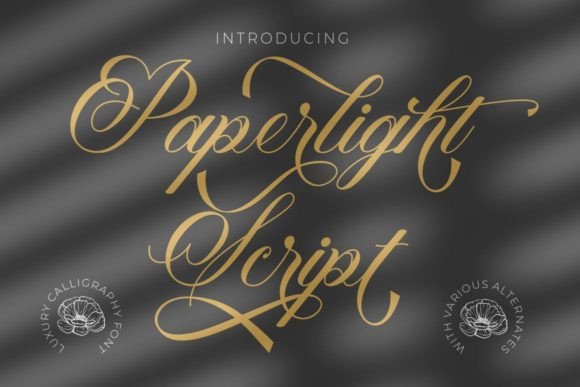
Paperlight Script: A Beautiful Handwritten Font
There’s something about the way Paperlight Script flows across a page that feels like a warm hug. I was working on a batch of candle labels when I first fell in love with this font. Its soft, elegant strokes added a touch of sophistication that made my handmade products feel more polished and professional.
As a crafter who loves creating printable art and custom stationery, I’ve tried countless fonts over the years. But Paperlight Script stands out for its balance of beauty and usability. It has a light, almost delicate appearance that still holds enough weight to make an impact. Whether I’m designing a greeting card or a farmhouse sign, this font brings a sense of charm and personality that other scripts just can’t match.
Using Paperlight Script in Real Projects
I often start by sketching out ideas for a project—maybe a set of seasonal tags or a set of wedding invitations. Once I have a rough layout, I bring in Paperlight Script to see how it looks with the rest of the design. The font works well with both modern and rustic themes, making it a versatile choice for a wide range of handmade products.
One of my favorite uses for Paperlight Script is on product labels. Whether it’s for candles, soaps, or bath salts, the font adds a personal touch that makes each item feel unique. I also use it for printable wall art and planner pages, where the script’s flowing lines create a sense of movement and energy.
How Paperlight Script Enhances Product Presentation
When you’re running a handmade business, every detail matters. From the packaging to the labels, everything contributes to the overall customer experience. Paperlight Script helps elevate the look of my products, giving them a premium feel that customers notice and appreciate.
This font is especially effective for short phrases and names. I’ve used it for wedding welcome boards, birthday invitations, and even small stickers. Its elegance makes it perfect for decorative wording, and it pairs beautifully with clean, simple fonts when needed.
For example, when I design a set of printable templates, I often pair Paperlight Script with a sans serif font like Montserrat or Open Sans. This contrast creates visual interest while keeping the design easy to read. It also helps maintain brand consistency across different materials, from social media graphics to printed brochures.
Practical Tips for Using Paperlight Script
When working with cutting machines like Cricut or Silhouette, I always test the font at different sizes to ensure it cuts cleanly. Paperlight Script works best for short text, as longer paragraphs can become hard to read. For small stickers or labels, I recommend using a slightly larger size to maintain clarity.
Another thing to consider is font pairing. While Paperlight Script is beautiful on its own, it often benefits from being paired with another font that complements its style. A simple serif font like Playfair Display or a bold display font like Bebas Neue can add depth and contrast to a design without overwhelming it.
Exploring the Features of Paperlight Script
Before I started using Paperlight Script, I made sure to check all the details. The font is PUA encoded, which means I can access all the characters and ligatures without any issues. It also includes multiple styles and alternates, allowing me to customize the look for different projects.
For those who sell digital downloads or printables, it’s important to verify the licensing terms. Paperlight Script is a commercial font, so I make sure to follow the guidelines when offering it as part of my shop items. This ensures that my customers can use the font legally and without any complications.
Whether I’m working on a seasonal project or a custom order, Paperlight Script has become one of my go-to fonts. Its unique style and versatility make it a valuable addition to any designer’s toolkit. From candle labels to wedding invitations, this font adds a touch of elegance that enhances the overall quality of my work.
As I continue to explore new creative ideas, I know I’ll keep coming back to Paperlight Script. It’s more than just a font—it’s a tool that helps bring my vision to life with style and grace.